
If you make a Voicemod purchase (and Voicemod does not detect your purchase after receiving the invoice), a reinstallation, restore/clean your computer, or you have a new one (sometimes it even happens because of some change in the computer: update, IP changes...) you have to activate (or reactivate) your PRO account.
First of all, what version of Voicemod are you on?
Voicemod V3
If you have purchased Voicemod, received the purchase invoice from Xsolla or Paddle and your Voicemod is not recognizing that you are PRO, please restart Voicemod:
- Close Voicemod completely:
-
WINDOWS
 :
:
- Click on the three dots in the upper left corner of the Voicemod window.
- Quit Voicemod
- Click on the three dots in the upper left corner of the Voicemod window.
-
MAC
 :
:
- With the Voicemod window selected, go to the top bar and click on Voicemod
- Quit Voicemod
- With the Voicemod window selected, go to the top bar and click on Voicemod
-
WINDOWS
- Open again Voicemod
If after restarting your Voicemod, it still doesn't detect your PRO account, you must go to your Voicemod account website to check if you are logged in with the correct email, the one associated with your PRO account.
In this case, the status should appear as Active:
If your Voicemod account appears that your PRO account is active, log out of Voicemod:
-
WINDOWS :
- Click on the three dots in the upper left corner of the Voicemod window
- Click on Account
- Log out
- Click on the three dots in the upper left corner of the Voicemod window
-
MAC :
- With the Voicemod window selected, go to the top bar and click on Voicemod
- Click on Account
- Log out
- With the Voicemod window selected, go to the top bar and click on Voicemod
Voicemod will be unlogged and this screen will appear.
- Click on "Get started!" and follow the instructions to log in.
If your Voicemod account website shows that you are not PRO:
-
Log out of your Voicemod account.
- In the upper right corner click on the Log out red button.
- Log in again with the correct email associated with your PRO account*.
*If you can't find the email address associated with your PRO account, please contact us. - Once you get your Voicemod Account to PRO status, you will need to relog into Voicemod so that it recognizes your PRO status.
Voicemod V2
REMINDER: This is a different and later step than logging in.
- Look for your Voicemod license key.
- If you don't want to search through your emails, let us help you here:
- Go to Settings tab > Click on License
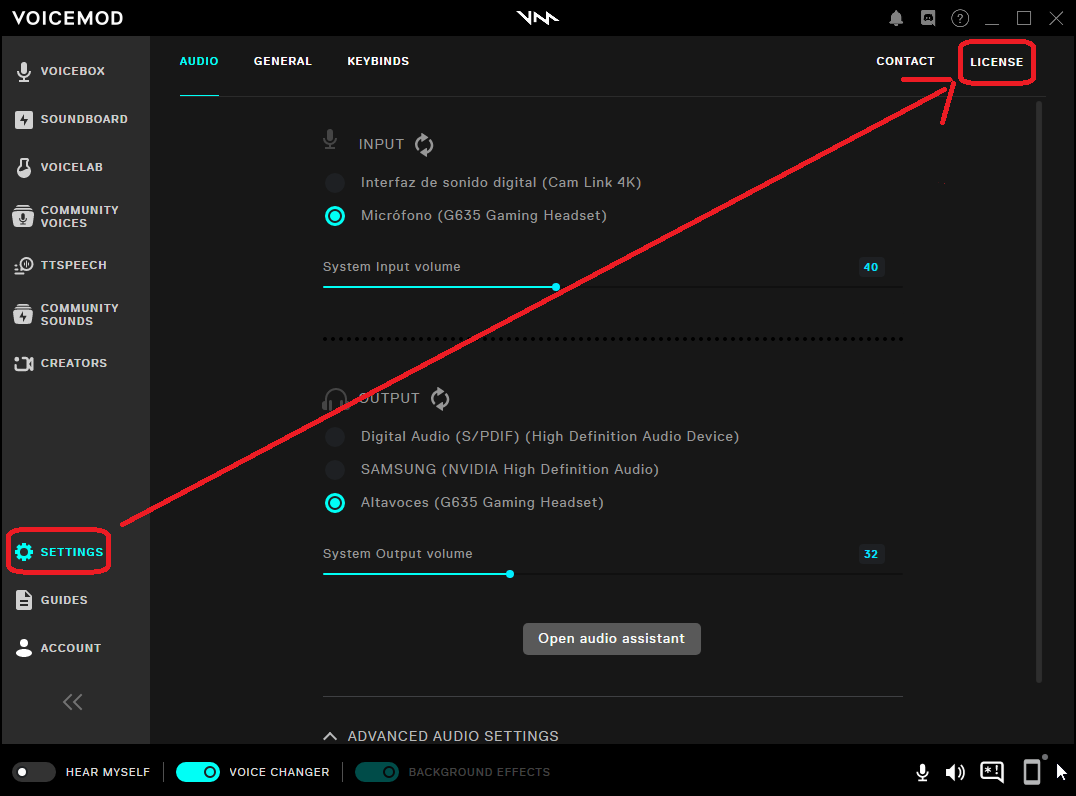
- Click on this "Can't find your license key?" button:
- Enter here the email with which you purchased Voicemod and click on Resend:
- If the email is invalid, you will have to try other emails you may have used.
*If you can't find the email with which you purchased Voicemod, please contact us. - If the email is valid, your license information will be sent to your email address.
-
You can filter by license@voicemod.net in your email:
- If you don't want to search through your emails, let us help you here:
-
Copy your license key, paste on your Voicemod app on the following window and click on "Link license":
Then, for security reasons, once you have activated the license for the first time on your PC, if you want to activate it again a second time, you will be asked to confirm the activation by email.
-
Go to your inbox email associated with your purchase (remember that it may not match the email with which you have logged in), and search on your email for the transfer your Voicemod PRO license.
- You can filter by license@voicemod.net in your email:
- You can filter by license@voicemod.net in your email:
-
- and click on "Click here to transfer the license".
If you have confirmed the request in less than 10 minutes, you will get this message in your browser:
- and click on "Click here to transfer the license".
-
- After that, go back to Voicemod and click "Continue".
- After that, go back to Voicemod and click "Continue".
-
- To finish, just click on OK. Your PRO license will be activated.
- To finish, just click on OK. Your PRO license will be activated.
-
- If you have received the email more than 10 minutes later or you have taken more than 10 minutes to confirm the request, you will receive this message when trying to confirm the activation request.
In this case, please start the reactivation process again.
In case you have requested the license reactivation several times in a short period, make sure you click on the reactivation link of the last mail received.
- If you have received the email more than 10 minutes later or you have taken more than 10 minutes to confirm the request, you will receive this message when trying to confirm the activation request.
Need more help? Click HERE