
Hearing a delay when you speak through Voicemod?
Try these Windows audio and performance checks to reduce it.
Voicemod needs a little time to process your voice, so some delay is expected. If the delay feels excessive, test these changes one at a time.
Before you start
Use headphones and select them as your output in Voicemod. Speakers can feed sound back into the microphone. If you hear two copies of your voice or ringing feedback, see How to solve audio feedback or hearing yourself twice.
Turn off microphone audio enhancements for a test
- Open Start → Settings → System → Sound and select your physical microphone under Input.
- If you see Audio enhancements, turn it off and test the delay.
- If that control is not shown, open More sound settings → Recording → your microphone → Properties. Look for an Enhancements tab or a signal-enhancements option under Advanced, and disable it for a test.
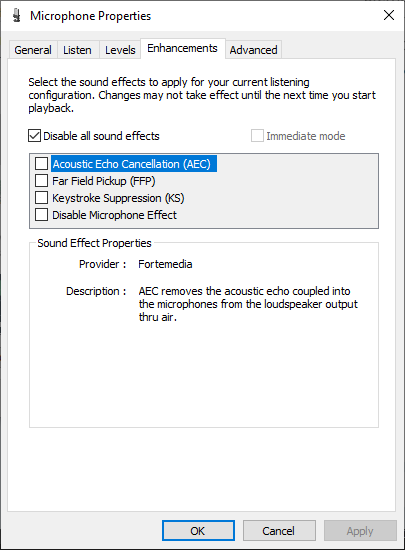
Check the sample rates of your audio devices
Voicemod recommends a 48,000 Hz format for compatible microphones and headphones. If the devices in your audio path use different formats, Windows or Voicemod may need to convert the audio.
- Completely close Voicemod and other apps using your audio devices.
- Follow How to set the Sample Rate of an Audio Device in Windows for your microphone and headphones. Choose an available 48,000 Hz option; the channel count and bit depth depend on each device.
- Reopen Voicemod, select your microphone and headphones again, and test the delay.
Check PC load while you test
Close apps that use a lot of CPU or process your audio, then test Voicemod again. If the delay appears only while a game or stream is running, compare the result with that app closed.
On a Windows 11 laptop, you can also test while plugged in and check Settings → System → Power & battery → Power mode. If Best performance is available, try it and compare the delay. The available power options depend on your PC.
Still need help?
Let’s take a closer look
Tell us whether the delay happens in Hear Myself, in another app, or both. Include your Windows and Voicemod versions, microphone and headphone models, the formats you selected, and whether the delay changes when other apps are closed.