
If you have problems with volume or audio transformation, it could be related to the Windows mixer.
You may encounter Voicemod not working with other platforms like Discord, Zoom or even your preferred games. Or maybe the Soundboard is not transmitting the sound correctly and the other side cannot hear your soundboard.
If this is the case you may need to reset your windows mixer.
Follow the next steps to reset it:
1.- Open Voicemod.
2.- Go to the Voicemod Settings->Advanced settings tab.
3.- Disable the anti-popping mode.
4.- Disable the exclusive mode.
5.- And without closing Voicemod (this is very important), resets the Windows mixer:
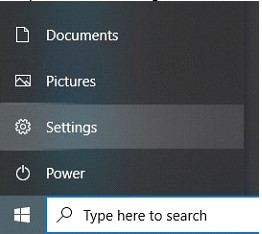
- Open Start -> Settings
- Go to "System":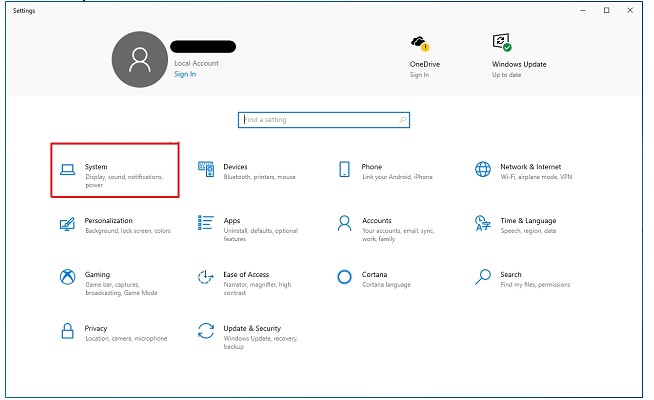
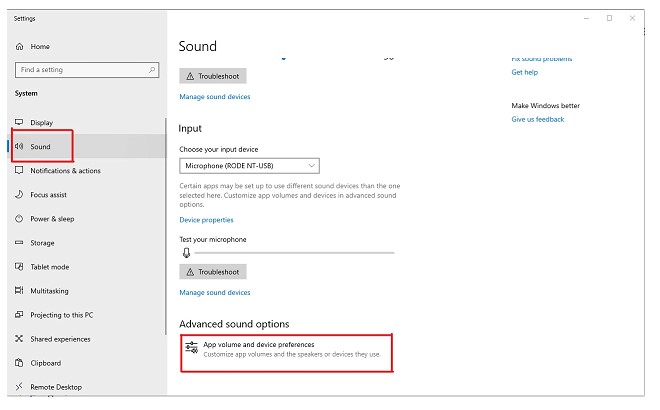
- Click on "Sound".
- Look for "Advanced sound options" and go to "App Volume and device preferences":
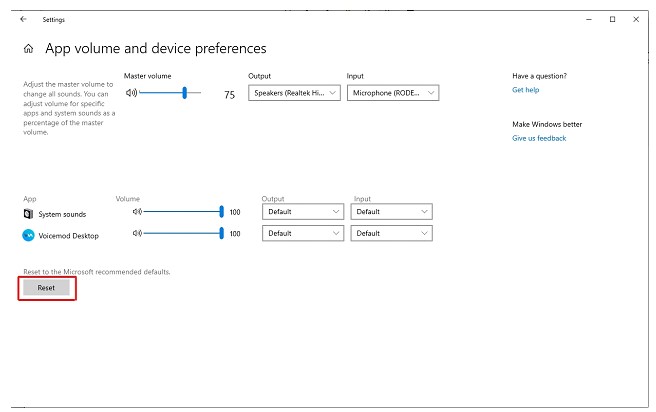
- Here, click on "Reset":
After that, restart Voicemod completely.